











Player guide
Inside Geometry Cube: Sunset Sandstorm
Explore the objective, key challenges, screenshots, and practical tips before your next run.
See the game in action
Play Geometry Cube: Sunset Sandstorm Online Free in Your Browser
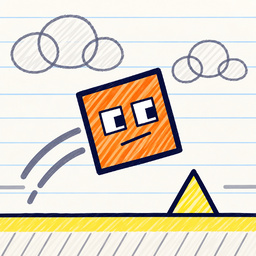
The central task in Geometry Cube: Sunset Sandstorm is to guide an automatic cube through all ten notebook pages. Players work toward that result by learning how to jump over spikes, ceiling hazards, platforms, and loops in time with the route. This guide explains the objective, important decisions, verified controls, and useful ways to guide an automatic cube through all ten notebook pages.

What Players Need to Accomplish
Geometry Cube: Sunset Sandstorm becomes easier to read when the objective is divided into short steps. When players watch the landing point rather than the cube itself, finish the immediate requirement, confirm the result, and only then move attention to the next problem. This method is especially helpful when speed increases while a single mistimed jump can restart the page appear together.
The challenge in Geometry Cube: Sunset Sandstorm remains fairer when players keep a recovery option. When players watch the landing point rather than the cube itself, that may mean saving space, stamina, ammunition, currency, a safe route, or a flexible move. As they try to hold the input only when repeated jumps are safe, the exact resource changes, but the value of a backup plan remains clear.
How the Main Mechanics Work Together
Geometry Cube: Sunset Sandstorm creates pressure through speed increases while a single mistimed jump can restart the page. When players watch the landing point rather than the cube itself, those elements matter because a poor decision can affect several later actions. As they try to hold the input only when repeated jumps are safe, players should identify the first point where the plan became unsafe, then change that moment instead of increasing speed everywhere.
Longer sessions in Geometry Cube: Sunset Sandstorm should not become automatic repetition. When players watch the landing point rather than the cube itself, players can set one specific improvement goal, such as cleaner timing or better resource use. As they try to hold the input only when repeated jumps are safe, a focused goal makes progress easier to measure than a vague attempt to play faster.
Progress in Geometry Cube: Sunset Sandstorm is shown through new music, page layouts, and denser obstacle chains mark progression. When players watch the landing point rather than the cube itself, new options are valuable when they solve an existing problem. As they try to hold the input only when repeated jumps are safe, they are less useful when they distract from the immediate task or consume resources needed for the next stage.

Controls for Desktop and Mobile Players
The cube moves independently, and your task is to jump at the right time. To make the cube jump, use one of the following: tap the screen, click the mouse button, or press the Space bar, Up Arrow, or W key. Keep the button pressed to make the cube leap again each time it touches the ground. A yellow jump pad will launch the cube high automatically. If you tap while the cube is passing through a ring, it will jump again in mid-air. Avoid touching spikes or ceiling thorns. You can land on top of blocks, but colliding with their sides will end your attempt. The flag button in the menu activates practice mode, where checkpoints are set automatically, and after a mistake, you resume from the last checkpoint. To pause the game, use the button in the corner, press Esc, or P. Complete a page to 100% to.
The listed controls come from the current official information for Geometry Cube: Sunset Sandstorm. Input support can differ between desktop and touch devices while players try to guide an automatic cube through all ten notebook pages, so they should use the mapping shown for their device and avoid assuming that an unlisted key has a function.
How Difficulty and Progress Develop
Geometry Cube: Sunset Sandstorm rewards attention to sequence. When players watch the landing point rather than the cube itself, the same actions can produce different results when performed in another order. Players should test the order that protects the main objective and reduces exposure to speed increases while a single mistimed jump can restart the page.
The most important decisions in Geometry Cube: Sunset Sandstorm concern jump over spikes, ceiling hazards, platforms, and loops in time with the route. When players watch the landing point rather than the cube itself, a useful action supports the current objective and leaves a workable follow-up. An action that offers a small reward but creates trouble with speed increases while a single mistimed jump can restart the page is usually a weak trade.
The opening of Geometry Cube: Sunset Sandstorm should be used to understand the active space and the next required result. When players watch the landing point rather than the cube itself, the middle phase rewards consistent execution. As they try to hold the input only when repeated jumps are safe, near the end, protecting progress is normally more useful than taking a needless risk for a minor gain.
Three Practical Tips for Better Results
- Begin by trying to watch the landing point rather than the cube itself. This supports the actual opening problem in Geometry Cube: Sunset Sandstorm instead of spending attention on a secondary reward.
- During the main challenge, remember to hold the input only when repeated jumps are safe. This choice protects progress when speed increases while a single mistimed jump can restart the page make the situation harder to read.
- After a setback, learn a difficult sequence in small visual sections. When players watch the landing point rather than the cube itself, the change should address the first failed decision rather than replace every part of the plan.
Planning Around the Hardest Moments
A failed attempt in Geometry Cube: Sunset Sandstorm still provides clear evidence. When players watch the landing point rather than the cube itself, players can compare position, timing, resources, and the order of actions. As they try to hold the input only when repeated jumps are safe, that review makes the next run more focused and prevents the same mistake from being hidden by a different outcome.
Visual feedback in Geometry Cube: Sunset Sandstorm explains whether an action helped. When players watch the landing point rather than the cube itself, changes in movement, score, board access, enemy position, or available resources should guide the following choice. As they try to hold the input only when repeated jumps are safe, guessing repeatedly removes that useful connection between cause and result.
Frequently Asked Questions About Geometry Cube: Sunset Sandstorm
Can the game work for short sessions?
While working to guide an automatic cube through all ten notebook pages, a short session can still be useful when the player focuses on one stage, round, or improvement goal. Longer play provides more time to study new music, page layouts, and denser obstacle chains mark progression.
What is the main objective in this game?
Geometry Cube: Sunset Sandstorm asks the player to guide an automatic cube through all ten notebook pages. When players watch the landing point rather than the cube itself, every useful action should support that result or prepare the next step needed to reach it.
How does the core gameplay work?
The core loop involves the need to jump over spikes, ceiling hazards, platforms, and loops in time with the route. When players watch the landing point rather than the cube itself, the player reads the current situation, acts, checks the result, and adjusts the next choice.
What makes later stages more difficult?
Difficulty grows through speed increases while a single mistimed jump can restart the page. When players watch the landing point rather than the cube itself, these pressures reduce safe options and make planning, timing, or resource control more important.
Related Games on GamesFree.gg
- Game/arrow Cube 3d
- Game/geometry Vibes
- Game/geometry Arrow 2
- Game/my Arcade Center
- Game/loop Crash 2
- Game/tb World
Game facts, controls, media, developer, and release information were checked against the official game information page on November 5, 2026.